
Task guide
Y1 Com Game Login: Sign In by OTP or Password Without the Guesswork
Short answer
Open the Y1.com app, enter the mobile number your account was created with, request a one-time code and type it in from the SMS. If you have set a password, you can use that instead. The y1.com website shares the same account, but open it only from a link you trust.
Last verified · By Y1.com Help Centre Editorial Team
What you need
A y1 com game login rests on two things you already control: the mobile number on your account and the SIM that receives its texts. Check each item before you start.
- The Y1.com app installed from the official link. If it is not on your phone yet, start with our Y1.com game download guide.
- The exact mobile number you registered with. A newer number you use for UPI is a different account.
- That SIM switched on and able to receive SMS, either in this phone or in one beside you.
- Your password, but only if you created one earlier. OTP sign-in works without it.
- No account yet? Follow the Y1.com register guide first, then come back here.
Step by step: Y1.com game login with an OTP
Launch the app and let it load
Tap the Y1.com icon and wait for loading to finish. If you signed in earlier and never logged out, the home screen may open directly with your balance, and you are done.
Choose sign-in, not registration
On a first launch or after logging out, the app offers a way to sign in and a way to register. Labels such as Log in or Sign in vary between builds. Registering an existing number only sends you in a circle.
Check the country code, then type the number
For an Indian number, the code should be +91. Type the ten digits without an extra leading 0, and do not repeat 91 if the field already shows it.
Request the code once
Select the OTP or code option and tap the button that sends it. Then wait. Tapping repeatedly can queue several codes, and only the newest one is likely to work.
Enter the code from the SMS
Open the text and type the digits, or accept the suggestion your keyboard offers from that SMS. If the app rejects the code, ask for a fresh one rather than retyping the old one.
Wait for the home screen
A successful sign-in lands you on the home screen, with your balance in the pill at the top and a VIP badge on your avatar.

Check the uid in the side menu
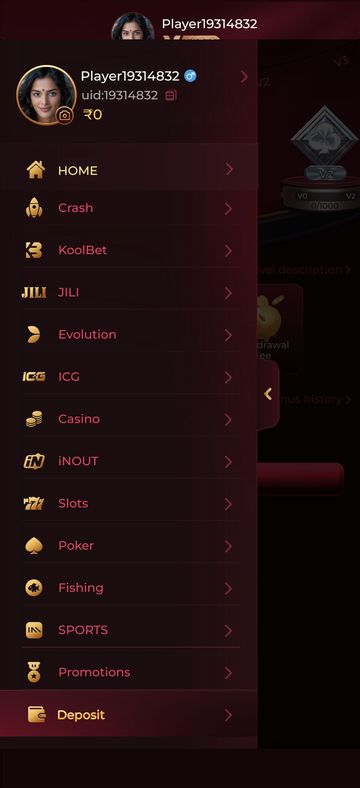
Tap MENU at the bottom left. The panel that slides out shows your player name, your uid with a copy icon and your balance. Note the uid somewhere safe, as customer service may ask for it.
What you should see
Once signed in, the top bar holds a balance pill with a wallet button, a gift icon and your avatar carrying a VIP badge. A brand-new account shows VIP0. Five tabs line the foot of the screen, starting with MENU and ending with EARN.
Opening MENU shows your name, uid and balance above the game list. An unfamiliar uid on a shared phone means someone else is signed in, so log out.
Need the app first?
Use only the official download link. Copies shared in groups or on other sites can be modified.
18+ Sponsored link. Real-money gaming carries financial risk and is legally restricted in India.
Common errors and fixes
In-app wording varies between builds, so the first column describes what you notice.
| Message | Likely cause | Fix |
|---|---|---|
| The code never arrives | SMS filters, weak signal or a mistyped number | Work through the table below. Y1.com OTP not received |
| Code refused or expired | An older code was used, or it sat too long | Request one new code and use only that. OTP fixes |
| Password not accepted | A typo, auto-capitalisation or an old password | Reset it by OTP. Y1.com forgot password |
| Number not found | The account was created with another number | Try your other numbers, or register a new account |
| Sign-in blocked or account restricted | A security or rules review on the account | Contact customer service. Y1.com account locked |
| App closes on the sign-in screen | An outdated or damaged install | Update from the official link. Y1.com app not opening |
App sign-in and the y1.com website
The app and the y1.com website use one account, keyed to the same mobile number. Sign in on either and you should see the same balance and uid, because both read from the operator’s servers.
How the two compare
In the app
Usually keeps you signed in between sessions and hands off to your UPI app smoothly. You install it once and update it from the official link.
On the website
Needs no install, but clearing browser data or using a private tab signs you out. It is also where lookalike pages do the most damage.
Reaching the website safely
Open the website only from a link you already trust, never from an ad, a forwarded message or a guessed address typed into search. Lookalike sites copy the Y1.COM logo and colours to collect numbers and codes.
Before typing anything, tap the address bar and read the whole domain. Swapped characters, such as the letter l in place of the digit 1, or extra words like “official” or “bonus”, mean you should close the tab.
Other ways to sign in
Password login, if you set one
If your account has a password, the sign-in screen may let you choose between a password and a code. Enter your registered number, switch to the password option and type it carefully. Check that your keyboard has not capitalised the first letter.
A password helps when your SIM has no signal, though some actions may still send a code to your number.
Forgot your password
Use the forgot-password option on the sign-in screen, verify your number with an OTP and set a new password. Pick one you do not use for email or UPI. The Y1.com forgot password article covers resets that loop or fail.
OTP not received: symptom, cause and fix
A missing code is usually a phone or network issue, not an account problem. Find the row that matches what you see.
| Symptom | Why it happens | Fix |
|---|---|---|
| No text arrives at all | DND settings, or a spam filter in your SMS app hiding unknown senders | Check the spam, blocked and promotions folders; pause any SMS-filtering app |
| Nothing on this phone, but the number is right | Dual SIM, with the registered number in the other slot or disabled | In SIM settings, check that slot is on and allowed to receive SMS |
| Code goes to a number you don’t recognise | Wrong country code, a missing digit or a doubled 91 | Clear the field and retype +91 plus ten digits |
| Codes came before but have now stopped | Too many requests in a short spell, so sending may pause | Stop tapping resend, wait a while, then ask for a single code |
| One bar of signal, or none | SMS delivery fails on a weak connection | Move near a window or outdoors, or toggle flight mode off and on |
| Screen says the number is not registered | Your account uses a different number | Try other numbers you own, or register if you never had an account |
| Register screen says the number already exists | You opened an account with it before | Go back to sign-in, and reset the password if needed |
Still nothing? The Y1.com OTP not received article goes deeper, including when to involve customer service.
Signing in on a new phone
Moving phones does not move or reset your account, because nothing important is stored on the handset. You simply repeat the y1 com game login on the new device.
Install the app on the new phone
Get it from the official link, not by copying the APK from the old phone.
Keep your number reachable
Move the SIM across, or keep the old phone on and charged until the code arrives.
Sign in, then compare the uid
Use your number and a fresh OTP, open MENU and check that the uid matches the one you noted.
Clear the old phone
Log out there, then uninstall before you sell, exchange or hand the device down.
Do not register again there, because a second account may break the app’s rules.
Staying signed in and logging out on shared phones
The app usually keeps you signed in until you log out, clear its data or uninstall it. On a shared handset, that lets anyone who opens it see your wallet.
- Log out when you finish. Tap your avatar to open your profile and look for the log-out option; its exact spot can move between builds.
- If the option is hard to find, go to Settings, Apps, Y1.com, Storage and clear data. This signs you out without affecting the account.
- Use your phone’s app lock or fingerprint lock for Y1.com and your UPI app, if the phone offers one.
- Do not let a shared Google account or browser save your Y1.com password.
Account locked or restricted
If sign-in or withdrawals are blocked, only the operator can review and lift the restriction. Lock rules can differ between cases, and customer service has the final say.
Do not open a new account to get around it. See Y1.com account locked for what to prepare before contacting them.
Fake login pages and OTP phishing
Warning
Your OTP is the key to your account. A genuine customer service agent does not need you to read it out, and our Telegram team will never ask for it, your password or your UPI PIN.
Watch for these signs of a fake y1.com login page or impostor:
- A sign-in link arrives by SMS, WhatsApp or a Telegram DM you did not ask for.
- The page promises a bonus or VIP upgrade just for entering your number and code.
- A countdown or “account will be closed” message pushes you to act fast.
- Someone claiming to be an agent asks you to forward the code you just received.
Already typed a code into a suspicious page? Sign in to the genuine app straight away, change your password if you have one and tell customer service. For money lost, call 1930 or report it at cybercrime.gov.in. Our Is Y1.com real or fake? guide explains how to check the app you have.
Tips for a trouble-free Y1 com game login
- Save your uid from the side menu. It is the quickest way for customer service to find your account.
- Keep the registered SIM active with a recharge, even if it is not your main number.
- Set a password once you are in, so a weak signal does not lock you out.
- Sign in on one device at a time where you can, and log out of any phone you no longer use.
Frequently asked questions
Why is Y1.com asking me to sign in again after I cleared its storage?
Your saved session lives on the phone, so clearing the app’s data, uninstalling or switching to a new phone removes it. Your account itself is untouched. Sign in again with your registered mobile number and a fresh OTP, and your balance and uid appear as before.
I got a Y1.com OTP that I never requested. Should I worry?
It usually means someone typed your number on a sign-in or reset screen, by mistake or on purpose. Do not share the code with anyone and do not tap links in follow-up messages.
If you have set a password, change it. If unrequested codes keep arriving, tell in-app customer service through the headset icon on the Wallet screen.
My old SIM is gone. Can I still reach my Y1.com account?
If you set a password and remember it, you may still be able to sign in without the OTP. Otherwise only the operator’s customer service can look at the account, and what they ask for can vary. We cannot move accounts between numbers. Avoid registering a second account in the meantime, as that can create a bigger problem.
Does logging out cancel a withdrawal I already requested?
It should not. Logging out ends the session on that phone, while a request you have submitted is handled on the operator’s side. After you sign back in, open the Wallet and check the records icon at the top right for its status. Our Y1.com withdraw guide explains each status.
Why does my sign-in screen look different from a friend’s?
Builds change over time, so button labels, the order of fields and even the tabs on the sign-in screen can differ between phones. That alone is not a warning sign. What matters is that your app came from the official link and opens to the Y1.COM home screen after you sign in.
Try it on your phone
Get the APK from the official link, or send your question to our Telegram. We answer guide questions; account problems go to in-app customer service.
18+ Sponsored link. Real-money gaming carries financial risk and is legally restricted in India.