
Task guide
Y1.com Register Guide: Sign Up With a Mobile Number and OTP
Short answer
To finish a Y1.com register, open the Android app, choose the sign-up option, enter your own mobile number and type the OTP that arrives by SMS. Set a password if the app asks for one, add an invite code only if someone you know gave it, then submit. You must be 18 or older.
Last verified · By Y1.com Help Centre Editorial Team
What you need
A Y1.com register takes one Android phone, one mobile number and a few quiet minutes. Tick off this list before you open the app.
- You are 18 or older. The app is for adults only.
- The Y1.COM app is already installed from the official link. If not, start with the Y1.com game download guide.
- An Indian mobile number that belongs to you, is switched on and can receive SMS right now.
- That number has never been used to open a Y1.com account before.
- A new password you don’t use for email, banking or UPI, in case the form asks for one.
- An invite code, but only if a person you actually know shared it with you.
Step by step: Y1 com sign up on your phone
We have no screenshot of the registration form itself, and its labels can shift between app builds. The steps below describe what the form asks for, not exactly where each box sits.
Open the app and pick the sign-up option
Tap the Y1.COM icon. If you are not signed in, look for a button worded like Register or Sign up. Choose that rather than the login option, because you are creating something new.
Type your mobile number
Enter the 10-digit number carefully. If the field already shows +91, don’t type it again. Read the digits back once before moving on; a single slip sends the code to a stranger.
Request the OTP and enter it
Tap the button that sends the code, then wait for the SMS. Type the digits exactly, or accept the autofill suggestion if your keyboard offers one. Ask for a new code once only if nothing arrives. No SMS at all? Work through Y1.com OTP not received.
Create a password if the form asks
Some builds ask you to set a password during sign-up. Mix letters and numbers, and avoid your birthday or the mobile number itself. Store it somewhere private, not in a shared family chat.
Add an invite code, or leave it blank
The invite box is for a code from a friend who already plays. If you arrived through their invite link, the field may already be filled. Skipping it does not stop you registering.
Submit the form
Read any age check or terms that appear, then send the form. Wait for the app to load instead of tapping the button repeatedly, which can trigger extra code requests.
Check the home screen
You should land on the home screen, already signed in. The balance pill at the top reads ₹0 and your avatar carries a VIP0 badge.

Open MENU and note your uid
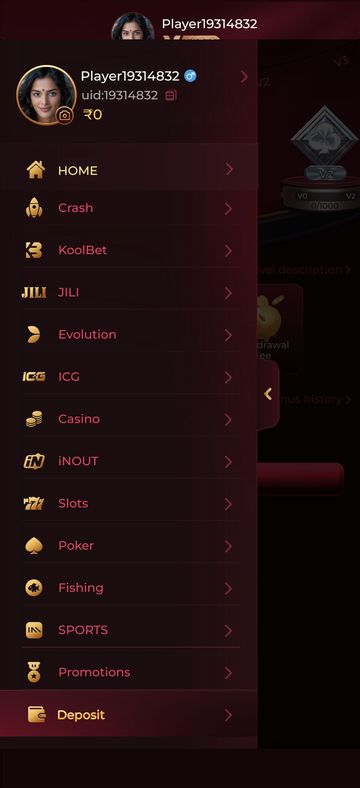
Tap MENU in the bottom bar. The side menu shows your player name, your uid with a copy icon, and your balance. Copy the uid somewhere safe.
What you should see
A home screen with the red Y1.COM glyph in the corner, a ₹0 balance pill with a wallet button, a gift icon and an avatar marked VIP0. Along the bottom: MENU, RANKING, GET CASH, VIP and EARN. Inside MENU, your name and uid sit above rows such as HOME, Crash, Slots and Promotions, with a highlighted Deposit row at the bottom. If you see all of that, your y1.com account exists and you are signed in.
Need the app first?
Use only the official download link. Copies shared in groups or on other sites can be modified.
18+ Sponsored link. Real-money gaming carries financial risk and is legally restricted in India.
Common errors and fixes
The app’s exact error wording can differ from what we list here. Match the meaning, and treat the app’s own screen or customer service as the final word.
| Message | Likely cause | Fix |
|---|---|---|
| No SMS code arrives | DND filtering, weak signal or the wrong SIM slot | Check the spam folder and signal, then read the OTP help article |
| Code rejected or expired | An older code was typed, or too much time passed | Request one fresh code and use only the newest SMS |
| Number already registered | An account already exists on that number | Sign in instead via the login guide |
| Too many attempts | Repeated code requests in a short time | Stop, wait a while, then try once; see Y1.com account locked |
| Account restricted soon after sign-up | A possible duplicate account on the same person, phone or number | Contact customer service; locked account steps |
| Invite code not valid | A typo, or the code was never real | Check it with your friend, or leave the box empty |
Who can register, and how many times
Only adults can sign up, and each person should hold a single account. Treat that as a hard rule, not a suggestion.
- 18+ only. Don’t register for a younger sibling or let a teenager use your phone to play.
- One person, one account. A second account for yourself, even on another number, is the kind of thing promotion rules typically forbid.
- One number, one account. A number that already has an account can’t be reused for a new one.
- Your own number. Borrowing a relative’s SIM causes trouble later, when OTPs for password resets or payouts go to their phone.
Rules on online real-money gaming also vary between Indian states. Check the position where you live before creating the account.
Choosing the right number
Register with the SIM you expect to keep for years. Your mobile number works like the account’s ID, so it matters more than the password.
On a dual-SIM phone, make sure the SIM you enter is active for SMS. A prepaid number that you rarely recharge is a poor choice, because it may be disconnected and later reissued to someone else.
Invite codes and invite links
Use an invite code only when someone you know personally sent it. The EARN tab’s Rules screen says registration must be completed through the invite link for the referral to count, so ask your friend for the link before you start.
Be wary of codes posted in public groups or sold by “agents”. Nobody needs to charge you for a code. For how referrals work from the inviter’s side, read Y1.com invite rewards explained.
The sign-up bonus
The app advertises a sign-up bonus of ₹500; check the Promotions screen and its rules before counting on it. Eligibility, expiry and any wagering attached to it are set by the operator and can change.
You can reach Promotions from the side menu, just above the Deposit row. Bonus money is not the same as cash you can withdraw. Y1.com promotions explained shows how wagering conditions hold bonus funds back.
Warning
Making extra accounts to collect the bonus again usually costs you the bonus and can freeze the balance on every account involved.
First things to do after signing up
Spend five minutes on setup before you add any money. It makes every later problem easier to solve.
Save your uid and registered number together
Keep both in one private note. Customer service asks for them when something goes wrong.
Read the Promotions rules
Open Promotions from MENU and read each offer’s conditions, especially anything about wagering or expiry.
Set your own money and time limits
Decide a monthly amount you can afford to lose and a daily time cap, and set a UPI limit if your bank app allows. Our responsible gaming page lists practical methods and free helplines.
Learn how money moves before paying
Read the Y1.com deposit guide so you understand the bonus tick and the wagering warning on the Deposit screen before you use it.
Tips for a trouble-free Y1.com register
- Register where your connection is steady, because a dropped connection mid-form can waste a code.
- Keep the SMS app open in split screen, or check notifications, while you wait for the code.
- If the app crashes during sign-up, don’t start over on a different number. Reopen it and try signing in first.
- Nobody from Y1.com, and nobody from this help centre, will phone you to ask for the OTP. Anyone who does is attempting a takeover.
- Next time you open the app, use the Y1 com game login guide if the session has ended.
Frequently asked questions
Can I open a Y1.com account with an email address instead of a phone number?
Y1.com registration is built around a mobile number and a one-time SMS code, and we know of no email route. Builds do change, so trust what your registration screen offers. Whatever route you use, the number you verify becomes the main key to your account, so pick one you will keep.
I think I signed up months ago and forgot. Should I register again?
No. Try signing in first with the number you probably used, following the Y1 com game login guide. If the password is the problem, use Y1.com forgot password.
A fresh account for the same person usually breaks the one-account rule and can get both accounts restricted.
Is an invite code compulsory for Y1 com sign up?
The invite code is meant for people who were referred, so treat it as optional unless your form clearly says otherwise. If a friend sent you their invite link, opening it before you sign up may fill the code for you. Never buy a code or accept one from a stranger in a Telegram or WhatsApp group; that is how referral scams start.
Where is my uid after I create the account?
Tap MENU in the bottom bar. The side menu opens with your player name, a line reading uid followed by a number, and a small copy icon beside it. Customer service usually needs this number to find your account, so copy it into your notes on day one.
Can I move my Y1.com account to a new mobile number later?
We know of no self-service option for this, and the rules may vary. Raise it with customer service (the headset icon on the Wallet) while the old SIM still works. Losing the registered number can make future OTP checks and password resets very difficult.
Try it on your phone
Get the APK from the official link, or send your question to our Telegram. We answer guide questions; account problems go to in-app customer service.
18+ Sponsored link. Real-money gaming carries financial risk and is legally restricted in India.