
Explainer
Y1.com VIP Page Walkthrough: Levels, Progress and Privileges
Short answer
The Y1.com VIP page opens from the VIP tab. It shows your level badge, a V1, V2, V3 track with a progress counter, and three locked privilege cards about withdrawals: a daily limit, free daily withdrawals and a fee. The level rules sit under “View VIP level description”, and spending extra just to climb is rarely worth it.
Last verified · By Y1.com Help Centre Editorial Team
Opening the Y1.com VIP page
Tap VIP, the fourth button on the bottom bar. The y1.com vip screen opens directly on your profile and level track, with no menu in between.
You can also glance at your tier from the home screen. The avatar at the top right carries a small VIP badge, which reads VIP0 on a fresh account.
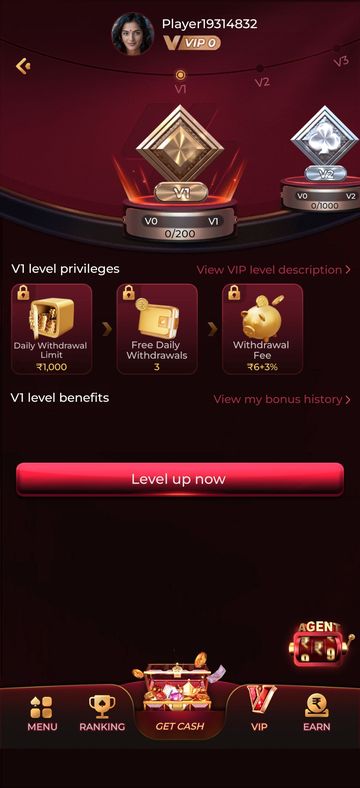
The walkthrough below follows the page from top to bottom, as captured on our test account on 16 September 2026.
Your avatar and VIP badge
At the very top are your avatar, your player name and a gold badge showing your current level, “VIP 0” until you move up. The player name matches the one shown in the side menu, where your uid also appears.
The badge is the only place on the page that states your present level. Everything below it describes the levels ahead.
The level track and progress counter
A curved track runs across the page marked V1, V2, V3 and beyond, with a small dot on the level currently in focus. Under it, each level has a gem-style trophy on a pedestal.
The next trophy peeks in from the right edge, which suggests you can swipe sideways along the track. On our screen, V1 sat in the centre and V2 was partly visible.
Each pedestal carries a plaque with the level you are leaving on one side, the level you are heading for on the other, and a counter in the form “0/…” between them. The first number is your progress; the second is the target for that level.
The page never says what fills the counter. In practice, progress on y1.com vip levels is usually tied to betting or deposit activity, but the level description screen is the authority, and its rule is the one that applies to your account.
The three privilege cards, and what they mean for you
Under the heading “V1 level privileges” sit three cards, each with a padlock in the corner. The padlock means you have not reached that level yet, so none of those privileges applies to you today.
Daily Withdrawal Limit
The most you can withdraw in total during one day at that level. If your withdrawable balance is larger, the rest may have to wait for another day.
Free Daily Withdrawals
How many withdrawals per day you can make without paying a fee. Going beyond that number the same day may bring the fee card into play.
Withdrawal Fee
The charge applied when you withdraw at that level. Check whether it is a flat sum, a percentage or both, and when exactly it applies.
We have left the values out. They differ by level, can change with an app update, and the figures on your own phone are the ones you will be held to.
This card row describes V1, not VIP 0. If you are still on VIP 0 and about to withdraw, don’t assume the V1 terms cover you; check the level description or ask customer service. Our Y1.com withdraw guide shows where limits and fees show up during a cash-out.
Need the app first?
Use only the official download link. Copies shared in groups or on other sites can be modified.
18+ Sponsored link. Real-money gaming carries financial risk and is legally restricted in India.
The links and button on the VIP page
Four controls sit below the track. Each one leads somewhere different, and only one of them explains the rules.
| Control | Where it sits | Use it for |
|---|---|---|
| View VIP level description > | Right of “V1 level privileges” | The rules: what counts towards progress, each level’s target and its privileges |
| V1 level benefits | Heading under the privilege cards | Benefits for the level in view; the space beneath it was empty on our test account |
| View my bonus history > | Right of “V1 level benefits” | A record of bonuses on your account, handy for checking whether a reward arrived |
| Level up now | Large red button lower down | A shortcut from the VIP page; it does not change what counts towards your level |
If you only open one of these, make it the level description. The track, cards and button all depend on rules that are spelled out there and nowhere else on the page.
Bonus history is worth a look too. Bonuses often come with wagering attached, and our Y1.com promotions explained page shows how that can hold back your withdrawable balance.
What to check before chasing a level
Depositing or betting more than you planned just to move a progress counter is a poor trade. The privileges on this page concern withdrawal limits and fees, and they only help if you have money left to withdraw.
- Read the level description and write down exactly what counts towards progress.
- Compare the next target with what you already spend in a normal month, not with what you could spend.
- Look for any rule that lowers a level after inactivity or a set period.
- Read the next level’s three privilege values and ask whether they would change how you actually withdraw.
- Open bonus history and note whether past bonuses carried wagering.
If you catch yourself betting to fill the counter rather than because you want to play, stop for the day. Our responsible gaming page covers budgets, phone limits and free helplines.
No one can sell you a VIP level
Messages offering to “upgrade” your account for a fee, or asking for your OTP or password to do it, are scams. Levels move only through the app’s own rules. See Is Y1.com real or fake? for how impostors operate.
When your VIP details look wrong
Screenshot the VIP page and the level description, then contact customer service through the headset icon on the Wallet screen. Do this if the counter has not moved after activity you believe should count, or a privilege value differs from what you saw earlier.
Include the date and a short note of what you expected. As an independent guide, we cannot view or adjust anyone’s VIP level, but we are happy to explain what a screen means.
Frequently asked questions
What does the padlock on each VIP privilege card mean?
The padlock shows that you have not reached that level, so its privileges are not active for you yet. On a new VIP 0 account, all three V1 cards carry one. Once your progress counter reaches the target, the cards for that level should unlock; the level description sets out the exact rule.
Why does my VIP progress counter still show zero?
The counter only moves for activity the app counts, and this screen does not say what that is. Progress is usually tied to betting or deposit activity, but open “View VIP level description” to see the actual rule.
If you are sure qualifying activity happened and nothing moved, screenshot the page and contact customer service.
Will a higher VIP level let me take out more money each day?
The Daily Withdrawal Limit card suggests the limit is set per level, so a higher level may allow a larger daily total. It does not add money to your withdrawable balance, though. Compare the values on your own screen, and see our Y1.com withdraw guide for how limits affect a cash-out.
Can a Y1.com VIP level go down after I reach it?
Some VIP systems lower a level after inactivity or at the end of a period, while others keep it for good. The VIP page itself does not say which applies here, so check the level description screen for any rule about keeping or losing a level before you plan around it.
Try it on your phone
Get the APK from the official link, or send your question to our Telegram. We answer guide questions; account problems go to in-app customer service.
18+ Sponsored link. Real-money gaming carries financial risk and is legally restricted in India.