
Task guide
Y1.com Withdraw Steps: Cash Out, Read the Status, Avoid Delays
Short answer
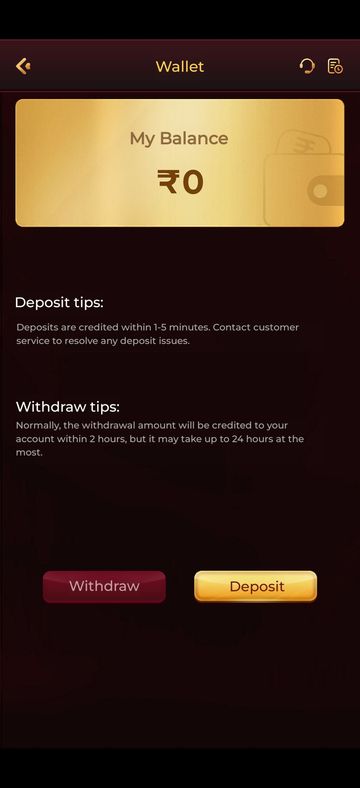
To make a Y1.com withdraw request, open the Wallet and tap the red Withdraw button. Add a payout UPI ID or bank account that carries your name, type an amount that fits inside your withdrawable balance, then submit. When we checked, the Wallet tip said payouts normally arrive within 2 hours, and within 24 hours at most.
Last verified · By Y1.com Help Centre Editorial Team
What you need
A Y1.com withdraw request only works on money the app already counts as withdrawable, sent to an account in your name. Check these points first.
- You are signed in to the account that holds the balance.
- The Withdrawable card on the Deposit screen shows more than zero, and at least the minimum that the Withdraw screen shows.
- Any bonus wagering you agreed to is complete.
- A UPI ID or bank account registered to the same name you play under.
- A government ID nearby, in case the app asks for verification.
- You know your VIP level’s daily withdrawal limit and fee from the VIP tab.
Step by step: a Y1 com withdrawal from the Wallet
We have no screenshot of the withdraw form, so the middle steps describe what it asks for rather than the exact layout.
Open the Wallet
On the home screen, press the small red wallet icon that sits within the ₹ balance pill.
Read the withdraw tip, then tap the red Withdraw button
The Wallet screen has a gold My Balance card, a Withdraw tips paragraph and two buttons. Withdraw is the red one on the left.
Bind your payout account the first time
On a first cash-out, the app asks where the money should go. Add your UPI ID or bank account details, then read every character back before saving.
Complete verification if prompted
The app may ask for identity details before paying. Use your own documents, with the name spelt the way your bank spells it.
Enter the amount and choose the destination
Type a figure no higher than your withdrawable balance and inside any limit the form shows. If you have bound more than one method, pick the right one.
Check any fee, then submit
Look for a fee or remaining free withdrawals before you submit. Tap the final button once and wait; a second tap can create a duplicate request.
Track the request in your records
Check the records icon, beside the headset in the Wallet header, for your request. Screenshot it with the time visible.
What you should see
Straight after submitting, your balance drops by the requested amount and a new entry appears in your records, usually with an in-progress status. Later it changes to a final status, and a successful payout shows up as a credit in your bank or UPI app.
Need the app first?
Use only the official download link. Copies shared in groups or on other sites can be modified.
18+ Sponsored link. Real-money gaming carries financial risk and is legally restricted in India.
Common errors and fixes
Labels in the app can be worded differently from ours. Go by the meaning, and let customer service settle anything unclear.
| Message | Likely cause | Fix |
|---|---|---|
| Amount exceeds withdrawable balance | Wagering from a promotion is still unfinished | Compare both balance cards; read Y1.com promotions explained |
| Daily limit reached | Your VIP level’s daily cap is used up | Try the next day, or check Y1.com VIP levels |
| Withdrawal processing | The request is in the payout queue or under review | Wait out the stated window; Y1.com withdrawal pending |
| Failed or rejected | Wrong UPI ID, closed account or a name mismatch | Fix the details, then send a new request |
| Verification required | The app wants to verify who you are | Submit your own documents through the app only |
| Account restricted or frozen | A rules or security check on the account | Contact customer service; Y1.com account locked |
Withdrawable balance versus Cash balance
Only the Withdrawable figure can leave your account; Cash balance also counts money still tied to promotion conditions. Both cards sit side by side at the top of the Deposit screen.
If you kept the first-deposit bonus ticked, the red line on that screen ties your cash-out to wagering, calculated as a multiple of what you deposited. Until enough bets are placed, part of your cash stays out of reach.
Hypothetical example
Imagine a ₹2,000 Cash balance, of which ₹500 is free and ₹1,500 is still waiting on wagering. The Withdrawable card would show ₹500, so a request for ₹2,000 would be refused. The figures are invented purely to illustrate the gap.
Binding a UPI ID or bank account
Bind a payout method registered in your own name, and double-check it before the first request. Most avoidable failures trace back to this step.
- UPI ID: open your UPI app, find your own ID on the profile page and copy it exactly, including the part after the @.
- Bank account: take the account number and IFSC from your passbook or bank app, not from memory.
- Name: use the same spelling your bank uses, including initials.
- Stability: avoid switching payout details shortly before a large request, since changes can trigger extra checks.
KYC and name matching
The app may ask you to verify your identity, particularly around your first or a larger withdrawal. It does not always happen, and requirements can change.
If a request comes, respond inside the app only. A name on your ID, your payout account and your profile that all agree is the quickest route through. Never send ID photos to someone who contacts you on WhatsApp claiming to be staff.
What each withdrawal status means
Your records show one status per request. The exact words may differ in your build, but they fall into these groups.
| Status | What it means | What to do |
|---|---|---|
| Processing or pending | Submitted and waiting to be paid or reviewed | Wait; don’t submit the same amount again |
| Successful or completed | The app reports the money as sent | Check your bank statement for the credit |
| Failed | The transfer did not go through | Check the payout details and whether the amount returned to your balance |
| Rejected | The request was declined, often for rules or verification | Ask customer service for the reason before retrying |
Y1.com withdrawal time
The app itself says most payouts land within 2 hours. On 16 September 2026, our test phone’s Wallet showed this under Withdraw tips: “Normally, the withdrawal amount will be credited to your account within 2 hours, but it may take up to 24 hours at the most.”
That is the app’s statement, not a promise from us. If 24 hours pass with no change, follow the withdrawal pending fixes.
Why withdrawals get delayed
| Cause | How to tell | What to do |
|---|---|---|
| Unfinished bonus wagering | Withdrawable is lower than Cash balance | Finish or wait out the promotion terms |
| Name mismatch | Request fails or goes to review | Bind an account in your own name |
| Manual review | Status stays in processing for hours | Reply to any verification prompt inside the app |
| Bank or UPI downtime | Your bank app shows maintenance notices | Wait until service resumes |
| Duplicate requests | Two entries for one amount in records | Tell customer service which one to keep |
VIP privileges that shape cash-outs
Your VIP level controls three withdrawal settings, all shown on the VIP tab. Tap VIP in the bottom bar to see them.

Daily Withdrawal Limit
The most you can take out in one day at that level.
Free Daily Withdrawals
How many requests a day avoid a charge.
Withdrawal Fee
The charge that applies at that level, as listed.
“View VIP level description” gives the detail. Don’t raise your betting just to climb a level. More is in Y1.com VIP levels.
Minimums and money facts
| Item | Current value |
|---|---|
| Minimum deposit | Shown at the top of the Deposit screen |
| Minimum withdrawal | Shown on the Withdraw screen |
| Sign-up bonus | ₹500 |
| Welcome bonus | Check the Promotions screen and its rules |
| Last verified |
Scam warning: nobody sells a faster payout
Warning
No agent, group admin or “finance officer” can release or speed up a withdrawal in exchange for a fee, tax or deposit. Anyone asking is running a scam.
Real delays are sorted through in-app customer service at no cost. We can’t touch accounts either, and we will never ask for money, your OTP or your UPI PIN. See Is Y1.com real or fake? for more warning signs.
Tips for a smooth Y1.com withdraw
- Deposit and withdraw with accounts in the same name; the Y1.com deposit guide explains the payment side.
- Before your first cash-out, try a small amount to prove your payout details work.
- Keep one request open at a time.
- Screenshot your records entry and your bank credit together.
- Decide what you will withdraw before you start playing, and stick to it.
Frequently asked questions
How can I tell if my Y1.com withdrawal has actually been paid?
Open the Wallet, press the records icon next to the headset, then find the request and read its status. A successful status means the app has sent it. Then look in your bank or UPI app, where a credit should show with a reference number. If both disagree, customer service needs screenshots of each.
Can I cancel a withdrawal once I have submitted it?
Don’t count on it. Any option to cancel, if one exists, would depend on how far the request has progressed. If you submitted the wrong amount or destination, contact customer service through the headset icon immediately and say so clearly. Don’t submit a second request to “correct” the first one.
Should I change my bound UPI ID while a payout is still processing?
Better not. Editing payout details mid-request can confuse matching and push the request into review. Wait until the status is final. If the request fails because the old ID was wrong, update the details afterwards and then place a fresh request.
The app says successful but nothing reached my bank. What now?
Give your bank a little time, since UPI credits can lag during busy hours. Check the account statement, not just the UPI app’s home screen. If the credit is still missing, send customer service your uid, the request time, the amount and a screenshot of the successful status.
Is my VIP level the reason I can only withdraw a small amount per day?
It may be. The VIP page lists a Daily Withdrawal Limit for each level, alongside free daily withdrawals and a withdrawal fee. Tap VIP in the bottom bar to see what applies to your level, and read the level description link for the exact conditions.
Try it on your phone
Get the APK from the official link, or send your question to our Telegram. We answer guide questions; account problems go to in-app customer service.
18+ Sponsored link. Real-money gaming carries financial risk and is legally restricted in India.