
Help article
Y1.com Account Locked or Frozen: Likely Causes and Your Options
Short answer
A Y1.com account locked message usually follows repeated wrong sign-in attempts, a security check or a review of payments or bonus use. The rules and any lock period belong to the operator. Pause before retrying, keep screenshots and payment references, contact in-app customer service, and never open a second account or pay anyone to lift it.
Last verified · By Y1.com Help Centre Editorial Team
“Account locked”
What it means: signing in is blocked for now. It often follows repeated failed attempts or a security check.
“Account restricted or frozen”
What it means: you may still get in, but some actions, such as deposits or withdrawals, are blocked. This usually points to a review.
The exact wording depends on the app build. The operator sets these rules, and its screen or customer service is the final word.
Quick fix
Stop retrying for a while
Every extra wrong attempt can extend a lock. Put the phone down; we can’t tell you a set waiting time because none is published.
Screenshot the exact message
Capture the full screen with the time visible. The precise wording helps customer service see which kind of block applies.
Contact in-app customer service
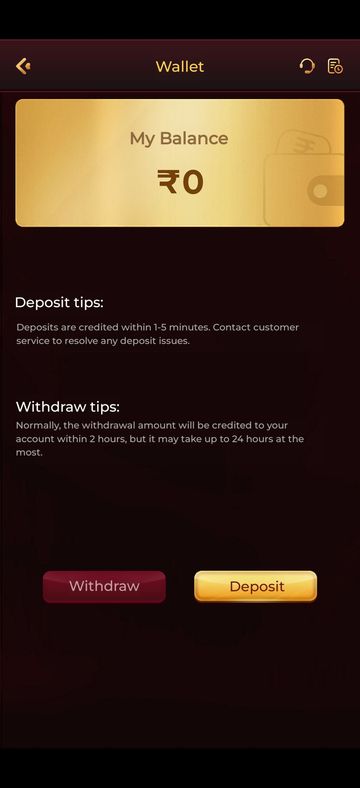
If you can still reach the Wallet, tap the headset icon at the top right. If a password problem started it, the Y1.com forgot password article may be quicker.
Causes and how to tell
| Cause | How to tell | Fix |
|---|---|---|
| Too many wrong attempts | Lock appeared right after failed passwords or codes | Wait, then sign in carefully or reset |
| Security check on a new device | First sign-in on a new phone or after reinstalling | Complete any check shown; contact customer service |
| Suspected multiple accounts or bonus abuse | Shared phone, family members on one device, repeated sign-up offers | Explain honestly to customer service |
| Payment dispute or chargeback | You disputed a UPI or bank payment | Share the dispute reference with customer service |
| Verification pending | The app asked for details you haven’t sent | Finish it inside the app |
| A restriction you requested | You asked customer service for a break | Let it run its course |
Need the app first?
Use only the official download link. Copies shared in groups or on other sites can be modified.
18+ Sponsored link. Real-money gaming carries financial risk and is legally restricted in India.
What you can do right now
Patience and a clean paper trail help most. These steps keep your case simple:
- Wait before signing in again, and type slowly when you do.
- Keep screenshots of the message, recent deposits and withdrawals.
- Note UPI references for any payment made around the time of the lock.
- Copy your uid from the profile block in the side menu, if you can open it.
- Answer customer service questions truthfully and in one thread.
- Don’t create a second account or sign in from several phones to test it.
Our Y1 com game login guide explains OTP and password sign-in, which helps once the block has cleared.
What this site can’t do
We can’t lift a lock, and neither can any website or group that isn’t the operator. This help centre is independent, with no view of accounts, balances or review notes.
What we can do is explain messages, point you to the right screen and help you prepare a clear request.
Reviews over multiple accounts, bonuses or chargebacks
These blocks tend to take longer because a person has to check the history. A shared phone, a relative using your UPI account or a disputed payment can all look suspicious from the outside.
Explain the real situation plainly. If you raised a chargeback by mistake, say so and give the dispute reference. Frozen withdrawals linked to a review are covered in Y1.com withdrawal pending.
A restriction you asked for is a safety tool
If you asked customer service to restrict or close your account, the block is working as intended. A self-requested pause gives you distance from spending when it matters most.
Resist the urge to find a way around it. Our responsible gaming page lists practical limits and free Indian helplines.
Ignore anyone offering account recovery
Warning
Messages promising to “unlock your account” for a fee, or asking for your OTP to verify you, come from scammers. Genuine help arrives only inside the app, and it’s free. Learn to spot impostors with Is Y1.com real or fake?
Still stuck?
Every decision about a locked or frozen account is made by in-app customer service. If you can still sign in, the headset beside the records icon on the Wallet opens it.
Our Telegram can help you understand the message or draft your request. Your note to customer service should contain:
- Your registered mobile number and uid
- A screenshot of the lock or restriction message
- When it first appeared and what you were doing
- Any recent new phone, reinstall or change of UPI account
- Payment references for disputes or deposits around that date
If the chat asks for your password, OTP or UPI PIN, stop. Real reviewers work from records, not your secrets.
Frequently asked questions
How long does a Y1.com account lock last?
We don’t know, and we haven’t found a published period we could verify. A lock after wrong passwords may clear by itself, while a review of payments or bonus use may need action from you. The message on screen and in-app customer service are the only reliable sources.
Will a new account get around a frozen one?
No, and it is likely to make things worse. Operators generally allow one account per person, and a fresh sign-up from the same person, phone or payment method can look like the very multiple-account behaviour that triggers reviews. Resolve the original account through customer service instead.
I asked for my account to be restricted. Can I reverse it early?
That is the operator’s decision, and many limits are designed not to lift on request. If you asked for a break, the pause is doing its job. Consider waiting it out, and read our responsible gaming page for other ways to stay in control.
Try it on your phone
Get the APK from the official link, or send your question to our Telegram. We answer guide questions; account problems go to in-app customer service.
18+ Sponsored link. Real-money gaming carries financial risk and is legally restricted in India.