
Safety guide
Y1.com Real or Fake: How to Check the App, Links and Chats
Short answer
Nobody can settle whether Y1.com is real or fake for you, including this site, so check it yourself. Download only through the official link, compare the screens with ours, refuse apps wanting SMS, accessibility or device admin access, and ignore anyone who messages you first. After installing a copy: uninstall, scan with Play Protect, call 1930.
Last verified · By Y1.com Help Centre Editorial Team
What “real or fake” can and cannot mean
Asking whether y1.com is real or fake mixes two questions. The first is whether the app on your phone is the genuine Y1.COM app or a copy. The second is whether you should trust it with money at all.
This page helps with the first. It shows how to check the download, the screens, the permissions and the people contacting you. We can’t answer the second for you: we are an independent help centre, not the operator, and we don’t describe the app as safe, licensed or legal.
So if you typed “is y1.com safe” into a search bar, use these checks to rule out copies and impostors. They are not a stamp of approval.
Check where the file came from
The genuine APK comes through one official link, the same one behind every download button on this site. Our Y1.com game download guide walks through it from the first tap.
- Start from the official link, never from an APK forwarded in a chat
- Skip mirror sites and video descriptions that promise a “newer” build
- Reject anything called mod, hack, VIP unlocked or unlimited coins; no such version is genuine
- Refuse to pay anyone to download, activate or “verify” the app
A fake y1.com app usually betrays itself with a promise the real one does not make. Extra balance, guaranteed wins and result predictors are bait for malware or fraud.
Android’s Play Protect may warn about any APK installed outside the Play Store, so a warning alone doesn’t decide the question either way. The Y1.com Play Protect warning article explains each option calmly, including why protection should stay on.
Compare your screens with ours
The genuine home screen has a layout you can recognise, which we recorded on test phones on 16 September 2026.
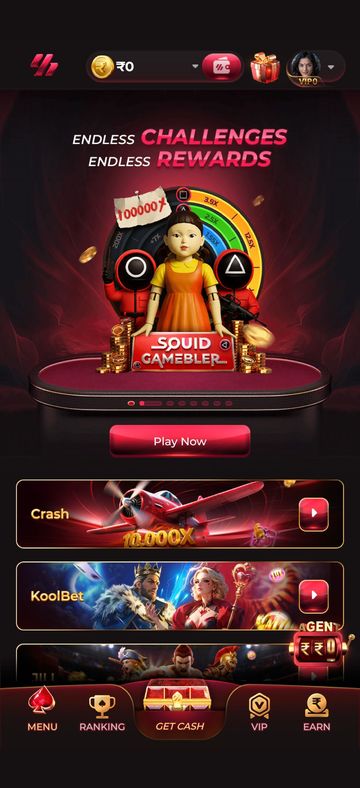
- A top bar with the logo, a balance pill and wallet button, a gift icon and your avatar wearing a VIP badge
- A rotating promo banner above game tiles such as Crash and KoolBet
- A floating AGENT button near the lower right
- Five bottom-bar buttons: MENU, RANKING, GET CASH, VIP and EARN
- A Wallet screen with a headset icon for customer service at the top right
A match is one good sign, not proof, since a layout is easy to copy. A mismatch, though, is reason enough to stop before you enter a mobile number or pay a rupee.
Lookalike domains and download pages
A web address containing “y1” proves nothing about who runs it. Anyone can buy a name built around a popular brand, then fill the page with the app’s logo.
- Spellings with a doubled letter, a missing dot or the number written out as a word
- The brand followed by words like download, bonus, latest or a year
- A string of redirects, pop-up tabs or an automatic download the moment the page loads
- A web form demanding your mobile number and OTP before any app is installed
We don’t host the APK, so a page offering a direct file in our name is not us. Bookmark our download page and reach the link from there each time.
Telegram and WhatsApp impostors
Our only Telegram is https://t.me/ddcomeplay. We don’t run a WhatsApp number, and any other channel using our name belongs to someone else.
That Telegram handles guide questions only. It will never:
- message you before you have written to us
- ask for an OTP, a password or your UPI PIN
- ask you to send money, pay a “processing fee” or unlock a withdrawal
- tell you to install a screen-sharing or remote-control app
Account help comes from customer service inside the app, through the headset icon on the Wallet and Deposit screens. A WhatsApp contact calling itself “Y1 support”, an agent or a recharge manager sits outside that system, whatever its profile picture shows.
Need the app first?
Use only the official download link. Copies shared in groups or on other sites can be modified.
18+ Sponsored link. Real-money gaming carries financial risk and is legally restricted in India.
Permissions that should worry you
A game needs very little access to your phone. To see what an installed app holds, open Settings, then Apps, choose the app and tap Permissions; the menu names vary a little between phone brands.
| Permission | What it allows | Verdict for a game |
|---|---|---|
| Read SMS | Seeing every text, including bank OTPs | Red flag: deny, then uninstall if it insists |
| Accessibility service | Reading your screen and tapping buttons for you | Red flag: never grant |
| Device admin | Blocking uninstall and locking the phone | Red flag: revoke at once |
| Display over other apps | Drawing windows on top of your UPI or bank app | Red flag if the app refuses to run without it |
| Contacts or call logs | Copying your address book and call history | Hard to justify: deny |
| Install unknown apps | Letting this app install further APKs | Suspicious: deny unless you know why |
We can’t publish a definitive permission list for the genuine app, because builds change. Judge each request with one question: which feature I can actually see needs this?
Keep your account locked down
Your mobile number and its OTP open your account, so the OTP is never yours to share. That includes friends, “agents” and callers claiming to be from the app or your bank.
- Use a screen lock, and don’t hand your unlocked phone to anyone offering to “check” the app
- If the app lets you set a password, choose one you use nowhere else
- Sign in only inside the app or on the official website, never through a link sent in a chat; our Y1 com game login guide shows the genuine sign-in flow
- Pay only from your own UPI app, and follow the Deposit screen’s note against reusing saved QR codes
If sign-in stops working or your account shows as restricted, read Y1.com account locked before trusting anyone who offers to fix it for a fee.
Installed a fake? Do this now
If money may already be moving, start with your bank; the phone clean-up can follow minutes later.
Protect your money first
If you typed a UPI PIN, card number or netbanking login into the app, call your bank on the number printed on your card or shown in its official app, and ask it to block suspicious transactions.
Call 1930
Ring the National Cyber Crime Helpline on 1930 as soon as you notice a loss. Reporting early matters when a transfer might still be stopped.
Uninstall the app
Go to Settings, then Apps, and uninstall it. If Android refuses, find the app under device admin apps in your security settings, switch that off, then uninstall. Delete the APK from your Downloads folder as well.
Run a Play Protect scan
In the Play Store, go to your account icon, then Play Protect, then Scan. Remove anything else it flags, and leave protection switched on.
Change passwords and your UPI PIN
Reset your UPI PIN from inside your bank’s own app or your usual UPI app, never through a link. Then change the passwords for your email and any account that shared a password, ideally from another device you trust.
Report it online
File a complaint at cybercrime.gov.in with screenshots, the name of the fake app, the link you used and every UPI transaction reference.
Genuine is not the same as legal
Knowing a download is genuine tells you nothing about the law where you live or your chance of losing money. Read the note below before you deposit anything.
Legal note for India
Real-money online gaming is legally restricted in India. The central Promotion and Regulation of Online Gaming Act, 2025 prohibits offering, operating, facilitating and advertising online money games, and several states have their own bans. Check the law that applies where you live. This site does not encourage playing where it is not permitted.
If gaming is already costing more than you meant to spend, our responsible gaming page lists free helplines and ways to take a break.
Frequently asked questions
Does this help centre ever send the first message on Telegram?
Never. Our only channel is our Telegram, and we reply only when you write to us first. We will not ask for an OTP, password, UPI PIN or any payment. An account that contacts you out of the blue using our name, or the app’s, is an impostor; block and report it.
The app looks right but wants permission to read my SMS. Is that a problem?
Treat it as a serious warning. Reading SMS lets an app see bank OTPs and payment alerts, and a game has no visible feature that needs it. Deny the permission, and if the app refuses to work without it, uninstall it and follow the after-a-fake steps on this page.
Can you look at my APK file and tell me it is genuine?
No. We do not inspect files or phones, and no message from us could guarantee a file. We can explain the checks on this page: where the file came from, whether the screens match and which permissions it requests.
Why won’t this website call Y1.com safe or legal?
Because we cannot verify either claim. We are an independent help centre, not the operator, and we have no view of its systems or licensing. Real-money gaming also carries financial risk and legal restrictions in India, so we explain how to check things rather than offering reassurance.
I paid a fake agent by UPI. Can in-app customer service refund me?
Usually not, because that money went to a stranger rather than into the app. Act fast instead: call your bank to report the transaction, call 1930, and file a complaint at cybercrime.gov.in with the UPI reference and chat screenshots.
Try it on your phone
Get the APK from the official link, or send your question to our Telegram. We answer guide questions; account problems go to in-app customer service.
18+ Sponsored link. Real-money gaming carries financial risk and is legally restricted in India.