
Task guide
Y1.com Deposit Guide: Pay by UPI From the Wallet Screen
Short answer
For a Y1.com deposit, tap the wallet button in the home balance pill, choose Deposit, pick a preset amount or type your own, decide whether to keep the first-deposit bonus ticked, then tap Pay Now. Approve the exact amount in your UPI app, note the UTR and return to the deposit page to check your balance.
Last verified · By Y1.com Help Centre Editorial Team
What you need
Every Y1.com deposit is a single UPI order that starts inside the app and finishes in your UPI app. Have these in place before tapping anything.
- You are signed in to your own account. If not, follow the Y1 com game login guide first.
- A UPI app on the same phone, linked to a bank account in your own name.
- Enough money in that bank account, and room left in your bank’s daily UPI limit.
- An amount decided in advance from your entertainment budget, not in the moment.
- A decision about the first-deposit bonus, because ticking it changes when you can withdraw.
- A way to screenshot the payment receipt, so you keep the UTR.
Step by step: add money to Y1.com with UPI
Open the Wallet from the home screen
Tap the red wallet button in the ₹ pill near the top of your home screen. Another route is MENU, then the highlighted Deposit row at the very bottom of the side menu.
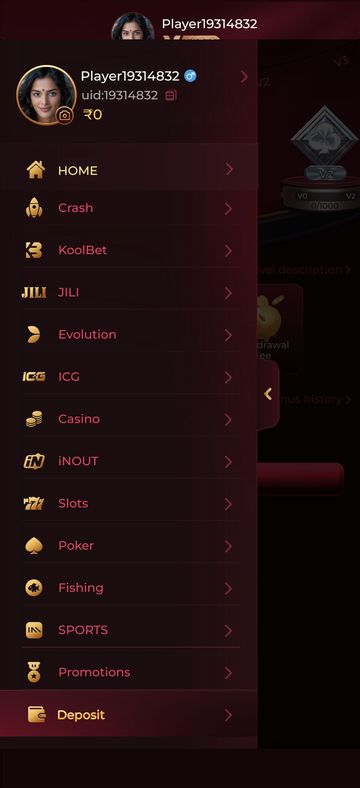
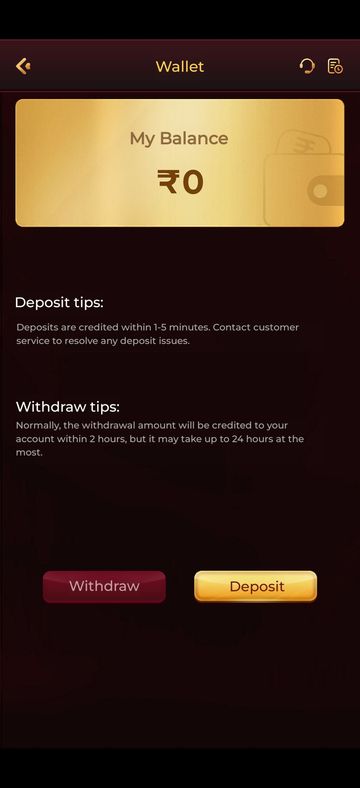
Tap the gold Deposit button on the Wallet
The Wallet shows a gold My Balance card, short deposit and withdraw tips, and two buttons. Deposit is the gold one on the right; red Withdraw is for cashing out.
Glance at your two balance cards
At the top of the Deposit screen sit Cash balance and Withdrawable. Note both figures now, so you can compare them once the payment lands.
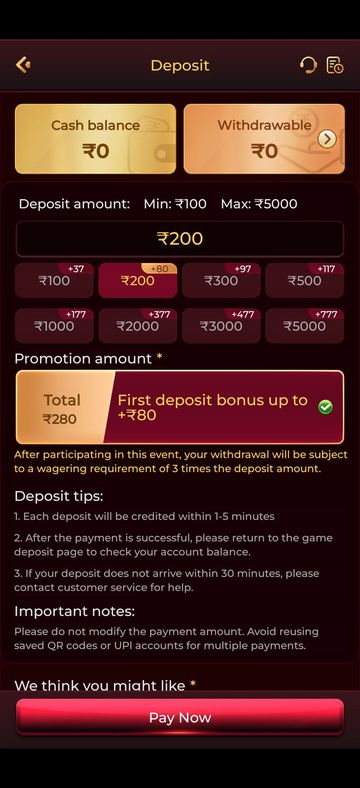
Pick a preset amount or type one
Tap one of the eight preset buttons, or type any figure into the amount field. The “Deposit amount” line above shows the minimum and maximum for one order; stay inside that range. Each preset carries a small “+” badge linked to the promotion, and those figures change, so we don’t quote them.
Decide on the Promotion amount tick
Under “Promotion amount” you will see a Total and a “First deposit bonus” option with a green tick. The tick means the bonus is included. Tap the option to remove the tick if you would rather skip it. Read the red line beneath before choosing.
Read the tips and Important notes
Scroll past the three numbered deposit tips and the Important notes. They are short, and the notes explain the two mistakes that most often leave a payment unmatched.
Tap Pay Now and approve in your UPI app
Pay Now hands you over to a payment page or straight to a UPI app. Check that the amount matches your order, then enter your UPI PIN inside the UPI app only. Don’t edit the figure.
Save the UTR
When your UPI app shows the payment as successful, open its details and screenshot the reference number, usually labelled UTR or UPI Ref No.
Come back to the deposit page
Switch back to Y1.com and return to the Deposit screen, as its second tip asks. Check whether Cash balance has gone up.
What you should see
After a successful payment, the Cash balance card on the Deposit screen rises by your amount, plus any bonus you kept ticked. The balance pill on the home screen shows the new figure too. Withdrawable may not rise by the same amount if you joined the promotion.
Need the app first?
Use only the official download link. Copies shared in groups or on other sites can be modified.
18+ Sponsored link. Real-money gaming carries financial risk and is legally restricted in India.
Common errors and fixes
Wording varies between payment pages and UPI apps, so match the situation rather than the exact phrase.
| Message | Likely cause | Fix |
|---|---|---|
| Paid by UPI but balance unchanged | The payment is still being matched to your order | Wait as the tips describe, then follow Y1.com deposit not credited |
| Deposit pending | The bank or gateway has not reported back yet | Keep the UTR and don’t pay again; pending deposit steps |
| Payment failed in the UPI app | Wrong PIN, bank decline or daily UPI limit reached | Check your bank statement, then start a brand-new order |
| No UPI app opens after Pay Now | No default app chosen, or an outdated UPI app | Update the UPI app, reopen Deposit and tap Pay Now again |
| Amount not accepted | Below the minimum or above the maximum on screen | Pick a figure inside the range on the “Deposit amount” line |
| Bonus missing from balance | The tick was off, or you were not eligible | Read the offer rules; see Y1.com promotions explained |
Cash balance and Withdrawable are not the same
Cash balance is everything sitting in your account; Withdrawable is only the portion the app will let you cash out. The small arrow on the Withdrawable card suggests you can tap it for more detail.
Right after a plain deposit, the two figures may match. Once promotion money or its wagering condition is involved, Withdrawable can lag behind until those conditions are met. The Y1.com withdraw guide covers the cash-out side.
The first-deposit bonus tick: keep it or remove it
Keeping the tick adds promotion money to your deposit, but it also attaches a wagering condition to your withdrawals. The red line under the option says that after participating, withdrawal is subject to a wagering requirement set as a multiple of the deposit amount. The multiple is on the screen; we don’t repeat it because it can change.
Removing the tick means you don’t join that event with this deposit. According to the red line, the wagering condition applies to people who participate.
Hypothetical example
Say you deposit ₹1,000 with the bonus ticked, and the rule were 4 times the deposit. You would need ₹4,000 in total bets before that money counts as withdrawable. These numbers are invented to show the arithmetic only. The real multiple is the one printed in red on your Deposit screen.
Limits and bonus figures
Minimums, maximums and bonus amounts change, so we show what is verified and point to the screen for the rest.
| Item | Current value |
|---|---|
| Minimum deposit | Shown at the top of the Deposit screen |
| Minimum withdrawal | Shown on the Withdraw screen |
| Sign-up bonus | ₹500 |
| Welcome bonus | Check the Promotions screen and its rules |
| Last verified |
How long crediting takes, according to the app
The app’s own tips promise minutes, not hours, for a normal deposit. When we checked on 16 September 2026, the Wallet tip read: “Deposits are credited within 1-5 minutes. Contact customer service to resolve any deposit issues.”
The Deposit screen listed three numbered tips on the same date:
- Each deposit is credited within 1-5 minutes.
- After the payment succeeds, return to the game deposit page to check your account balance.
- If the deposit does not arrive within 30 minutes, contact customer service for help.
These are the app’s statements, not our guarantee. Bank downtime can stretch them.
The Important notes, word for word
The Deposit screen carries two rules under “Important notes”:
From the Deposit screen
“Please do not modify the payment amount. Avoid reusing saved QR codes or UPI accounts for multiple payments.”
In practice: pay the exact order amount, and tap Pay Now for a fresh order every time instead of paying an old QR code from your gallery or UPI history.
If the money left your bank but the balance did not move
Don’t pay a second time. Open your UPI app, make sure the payment shows as successful, and screenshot the UTR.
If 30 minutes have passed, reach customer service through the headset icon in the Wallet or Deposit header. Send your uid, the amount, the time and the UTR. The full checklist is in Y1.com deposit not credited.
Paying safely with Y1 com UPI
- Your UPI PIN is only for approving a payment you started. Entering it never receives money.
- Ignore anyone offering a “recharge” to their personal UPI ID for extra bonus. Deposit only through Pay Now.
- Decline collect requests that you did not create from the Deposit screen.
- Pay from an account in your own name. It keeps later withdrawals simpler.
Tips before your next deposit
- Decide on the bonus tick before choosing an amount, not as an afterthought.
- Keep one screenshot folder for UTRs and delete them only after the balance appears.
- Avoid depositing late at night during announced bank maintenance windows.
- If a deposit feels rushed or emotional, stop and read our responsible gaming page.
Frequently asked questions
Which UPI apps can I use to add money on Y1.com?
We can’t give a fixed list, because the payment page after Pay Now decides which apps or QR options appear, and that can change. When your phone asks which app should open the payment, pick one linked to a bank account in your own name. If none opens, update your UPI app and start a new order.
Can I remove the first-deposit bonus after my payment has gone through?
Plan on no. The green tick is chosen on the Deposit screen before you tap Pay Now, and nothing on that screen suggests you can change it afterwards. If you included it by mistake, ask customer service through the headset icon straight away and explain before you place any bets.
What is a UTR and why keep it?
A UTR, or Unique Transaction Reference, is the 12-digit number your bank gives each UPI payment. Your UPI app shows it in the payment’s details. It is the one piece of proof customer service can trace, so screenshot it for every deposit until the money is on your Cash balance.
Why does the Deposit screen warn against reusing a saved QR code?
Each Pay Now creates a fresh payment request tied to your order. A QR code or UPI account saved from an earlier payment may no longer belong to that order, so money sent to it might not be matched to your account. Start a new order every single time.
How much should I put in the first time?
Choose the smallest amount the screen allows that fits a budget you have already set aside for entertainment. A small first payment lets you see how the UPI handoff and crediting work before larger sums are involved. Never deposit borrowed money or cash meant for bills.
Try it on your phone
Get the APK from the official link, or send your question to our Telegram. We answer guide questions; account problems go to in-app customer service.
18+ Sponsored link. Real-money gaming carries financial risk and is legally restricted in India.