
Help article
Y1.com Deposit Not Credited: Match Your UPI Payment to the Wallet
Short answer
If a Y1.com deposit is not credited, open your UPI app first and read the payment status. Only a successful payment needs chasing. Note its UTR number, wait out the 30 minutes the Deposit screen mentions, then send customer service the UTR, amount, time and a screenshot. Never pay a second time to hurry the first.
Last verified · By Y1.com Help Centre Editorial Team
“Deposit pending”
What it means: an order exists for your payment, but the money hasn’t been matched to your wallet yet. Check your UPI app before doing anything else.
“Paid by UPI but balance unchanged”
What it means: your UPI app says success, yet Cash balance on the Deposit screen hasn’t moved. This case needs your UTR number and, after the wait, customer service.
These are the symptoms players describe. The status label inside your records may be worded differently.
Quick fix
Read the status in your UPI app
Open the payment from your UPI app’s history. Success means the money left your account and was accepted. Pending means the banks are still settling it. Failed means no deposit happened, even if your bank balance looks lower.
Return to the Deposit screen and look again
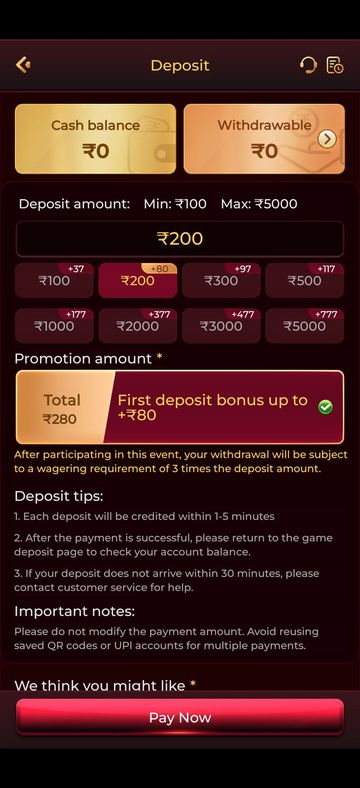
The app itself suggests going back to the deposit page once a payment succeeds. Check Cash balance there, then tap the records icon at the top right to see whether your order is listed.
Give it 30 minutes, then ask customer service
On 16 September 2026, the Deposit screen’s tips gave 1-5 minutes as the usual credit time and 30 minutes as the point to raise it. After that, tap the headset symbol in the Deposit screen’s top corner and send your UTR.
Causes and how to tell
| Cause | How to tell | Fix |
|---|---|---|
| UPI payment still settling | UPI app shows pending or processing | Wait for a final status; don’t pay again |
| Payment failed | UPI app shows failed; bank may still show a debit | Nothing to credit; watch for the bank reversal |
| Amount edited before paying | You typed a different figure in the UPI app | Send customer service both amounts and the UTR |
| Old QR code or saved payee reused | You scanned a saved image or paid a payee from an earlier deposit | Report it with the UTR; start a fresh order next time |
| Ordinary matching delay | Success shown only a few minutes ago | Wait until the 30-minute mark |
Need the app first?
Use only the official download link. Copies shared in groups or on other sites can be modified.
18+ Sponsored link. Real-money gaming carries financial risk and is legally restricted in India.
Find your UTR number first
The UTR is the reference customer service uses to locate your payment, so find it before you message anyone.
- In your UPI app, open the transaction and look for UPI Ref No., UTR or transaction ID.
- Check the debit SMS from your bank, which often repeats the reference.
- Take one screenshot showing amount, date, time, status and reference together.
- Cover your bank account number; the reference is enough.
Check the order in your Wallet records
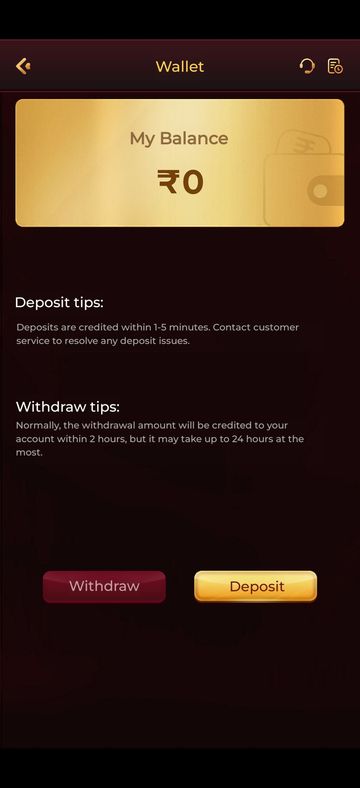
The records icon, next to the headset at the top right of the Wallet, shows whether the app registered your order at all.
Open the Wallet
Tap the small wallet button beside your balance on the home screen.
Tap the records icon and compare
Find the deposit by time and amount, then set it against your UPI app. Labels can vary by build. A mismatch, or no order at all, is exactly what customer service needs to hear.
Why edited amounts and reused QR codes cause trouble
The Deposit screen’s Important notes warn against both: don’t change the payment amount, and don’t pay twice through a saved QR code or UPI account.
Deposits are typically matched to the order that produced them. A different figure, or a payee saved from an older order, may not match automatically and then needs a manual check.
Hypothetical example
You create an order for ₹1,000, then type ₹1,100 in your UPI app. The payment succeeds, but the order still expects ₹1,000, so the credit can stall until staff look at it.
Begin every deposit as a new order. Our Y1.com deposit guide walks through those screens in sequence.
If the UPI app says failed
A failed payment is not a Y1.com deposit, so customer service has nothing to credit. Money taken from your account comes back through your bank, commonly within a few working days, though the timing isn’t fixed. If it hasn’t returned, use the complaint option on that transaction in your UPI app, or call your bank with the UTR.
Never pay again to push a pending deposit
Warning
A second payment won’t nudge the first one through; it only doubles what you need to trace. Strangers who offer to “release” a stuck deposit for a small fee are scammers. See Is Y1.com real or fake? for how impostors work.
Still stuck?
Tracing a deposit, crediting it or fixing a mismatched order is work only in-app customer service can do. We run an independent guide and can’t see your wallet, orders or payments.
Our Telegram can help you read a confusing UPI status or locate the UTR. For customer service, put all of this in one message:
- Your uid, copied from the profile block in the side menu
- The UTR or UPI reference number
- Amount on the order and amount actually paid, if they differ
- Date and time of payment, and the status your UPI app shows now
- A screenshot of the UPI transaction details
Leave out your UPI PIN and any OTP. Tracing a deposit never needs them, and anyone asking for either is not genuine staff.
Frequently asked questions
Should I pay again if my first Y1.com deposit is stuck?
No. A repeat payment creates a second order to trace and does nothing for the first one. If both later succeed, you have two cases open instead of one. Let the first payment settle as success or failed, and contact customer service with its UTR only once it shows success.
Where is the UTR number in my UPI app?
Open the payment from your UPI app’s transaction history and tap it for full details. Apps label the reference differently, for example UPI Ref No., UTR or transaction ID; it is usually a 12-digit number. Your bank’s debit SMS often carries the same reference. Copy it exactly.
My UPI app shows failed but my bank balance dropped. Is the money lost?
Usually not. When a UPI payment fails after a debit, the bank normally reverses it, often within a few working days, but your bank sets that timing, not Y1.com. If the amount doesn’t return, raise a complaint on that transaction in your UPI app or call your bank with the UTR.
Try it on your phone
Get the APK from the official link, or send your question to our Telegram. We answer guide questions; account problems go to in-app customer service.
18+ Sponsored link. Real-money gaming carries financial risk and is legally restricted in India.