
Help article
Y1.com Withdrawal Pending: Read the Delay Before You Escalate
Short answer
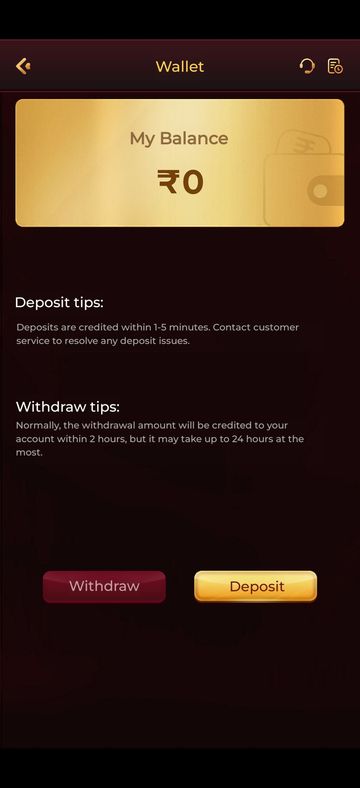
A Y1.com withdrawal pending for a short time is usually normal. On 16 September 2026, the Wallet’s withdraw tip put the usual payout time at 2 hours, with 24 hours as the outer limit. Once that limit passes, check the record, your UPI ID and name, and any bonus wagering, then contact in-app customer service.
Last verified · By Y1.com Help Centre Editorial Team
“Withdrawal processing”
What it means: your request was accepted and is waiting to be paid out. Within the Wallet tip’s window, this is normal.
“Withdrawal pending after 24 hours”
What it means: the request has gone past the longest time the Wallet tip mentions. Check your payout details, then contact customer service.
Status labels in your records can be worded differently and may change between app builds.
Quick fix
Count the hours properly
Measure from when you submitted the request, not from when you noticed. The Wallet tip, as we read it on 16 September 2026, treats 2 hours as normal and 24 as the ceiling.
Open the record and read the status
Tap the records icon at the top right of the Wallet. If the request shows failed or rejected, skip to the section on rejected requests below.
Check the UPI ID you withdrew to
Set the saved payout ID beside the one in your UPI app’s profile and compare every character. One wrong letter sends the request nowhere.
Causes and how to tell
| Cause | How to tell | Fix |
|---|---|---|
| Still inside the normal window | Under 24 hours since you submitted | Wait; don’t submit a second request |
| Bank-side delay | Weekend, bank holiday or announced UPI maintenance | Wait, then ask customer service after 24 hours |
| Wrong UPI ID | Saved ID differs from your UPI app profile | Correct it and ask about the stuck request |
| Name mismatch | Payout account belongs to a relative or friend | Use an account in your own name |
| Verification requested | The app or customer service asks for details | Complete it with your own documents |
| Bonus wagering unmet | Withdrawable is lower than Cash balance | Read the promotion rules before withdrawing |
| VIP limit reached | Several withdrawals today, or a fee appears | Check your level’s privileges on the VIP tab |
Need the app first?
Use only the official download link. Copies shared in groups or on other sites can be modified.
18+ Sponsored link. Real-money gaming carries financial risk and is legally restricted in India.
Bank-side delays, weekends and holidays
A payout can leave on time and still land late, because your bank has to accept the credit. Scheduled UPI maintenance, bank holidays and late-night requests all stretch the wait.
Look for a maintenance notice from your bank, give the request its full 24 hours, and keep the record screenshot ready.
Wrong UPI ID or a name that doesn’t match
Payout details in your own name, typed exactly, prevent most holds. Payment partners commonly compare names, so money headed to someone else’s account can be held or returned.
- Open your UPI app and check the ID and the name under your profile.
- Make sure the bank account behind that ID is yours, not a family member’s.
- Avoid changing payout details just before a withdrawal.
- If the ID was wrong, fix it, then ask customer service what happens to the old request.
Verification, wagering and VIP limits
Identity checks
The app may ask for KYC or other verification, for example on a first or larger withdrawal. The request can wait until you respond. Share documents only inside the app or with in-app customer service.
Wagering on bonus funds
Bonus money isn’t withdrawable until its wagering requirement is met. A gap between Cash balance and Withdrawable on the Deposit screen usually means a promotion is still active.
Hypothetical example
Suppose an offer required total bets of ten times a ₹1,000 deposit. You would need ₹10,000 in bets before that money counts as withdrawable. The real multiple is on your own Deposit screen.
VIP daily limits and free withdrawals
The VIP tab shows three privilege cards per level, covering the withdrawal fee, a daily cap and a count of free daily requests. Going past your cap or free count can affect a payout. See Y1.com VIP levels for what each card means.

If the request is rejected or failed
A rejected withdrawal usually returns to your Y1.com balance, but check rather than assume. Open the records icon, read the status, then look at your balance.
Fix the cause before trying again: the UPI ID, the name or the wagering. The Y1.com withdraw guide explains each status and the full request flow.
Nobody can speed up a payout for a fee
Warning
No agent, group admin or “payment manager” can fast-track your money in exchange for a charge. Demands for a tax, release fee or extra deposit to free a payout are scams. Keep your OTP to yourself as well.
Still stuck?
A request past 24 hours belongs with in-app customer service; open the headset in the Wallet’s top-right corner. Only the operator can see where the payout is, release it or correct payout details. We are an independent guide with no view of your records.
On Telegram, we can help you read a status label or work out whether wagering is holding your balance. When you write to customer service, include:
- Your uid from the side menu profile block
- The exact time you submitted and the amount requested
- A screenshot of the withdrawal record showing its status
- The UPI ID or bank account the payout was going to
- Whether you changed payout details or used a bonus recently
Customer service doesn’t need your UPI PIN, OTP or password to look into a payout, so never type them into a chat.
Frequently asked questions
Does a weekend or bank holiday slow down a Y1.com payout?
It can. The operator sends the payout, but your bank still has to accept the credit, and banks run their own maintenance windows and holiday schedules. A request made late on a Saturday may use more of the stated window. If the record still shows processing after 24 hours, contact customer service.
If a withdrawal is rejected, where does the money go?
In most cases a rejected or failed request goes back to your Y1.com balance, but we can’t promise that for every case. Open the records icon on the Wallet, find the request and read its status, then check your balance. If the amount is in neither your balance nor your bank, send customer service the record screenshot.
Someone on Telegram says they can release my payout. Is that real?
No. Payouts come from the operator’s own system, and genuine delays are handled free through in-app customer service. Anyone who wants a release fee, a tax or your OTP is after your money or your account. Block them and read Is Y1.com real or fake? before replying to anyone else.
Try it on your phone
Get the APK from the official link, or send your question to our Telegram. We answer guide questions; account problems go to in-app customer service.
18+ Sponsored link. Real-money gaming carries financial risk and is legally restricted in India.